# Demo1 - PipeNet
We will use [demo_PipeNet.xml](https://github.com/Jack0Chan/pyuppaal/blob/main/src/test_demos/demo_PipeNet.xml) as an example to help understand how `pauppaal` contributes to scientific research **partially observable** system, including:
- (1-3) Modeling the real-world observation into UPPAAL's Template, by constructing `observer_monitor` with builtin `pyuppaal.Monitors` that returns `pyuppaal.Template`;
- (3) Verify and get parsed counter example with `pyuppaal.SimTrace`.
- (4) Get communication graph to analyze the relationship among Timed Automata.
- (5) Find all patterns of a certain property.
### 1. Problem Description
There is a pipe-net that has invisible paths between the `Entry` and 3 different `Exits`.
One day, two balls are put into the `Entry` at the global time (gclk) 0 and 1000, and are observed from `Exit1` and `Exit2` at the global time 500 and 1550.
You want to know what happends to the balls -- all possible paths that can lead to such a input-observation.
### 2. Modeling the PipeNet
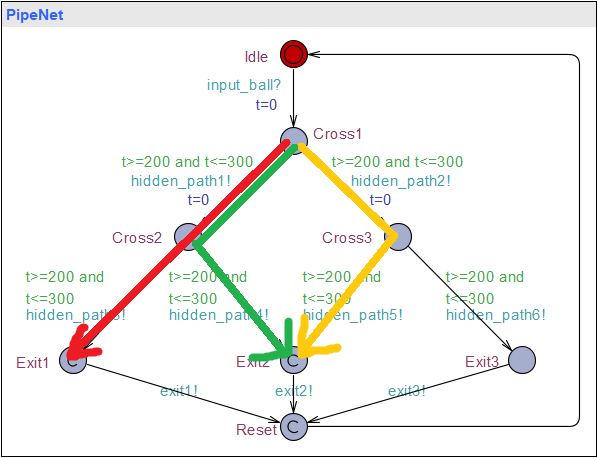
As shown in the figure below, the guard on the edge is the falling time for each path, e.g., if a ball goes through hidden_path1, it will take `200` to `300` seconds.
 ### 3. Load the Model and Set Inputs & Observations
Now we will
1. Add an `Input` template that puts the balls into the `Entry` at `gclk==0` and `gclk==1000`.
2. Add an `Observer` template that indicates the observations from `Exit1` at `gclk==500`, and `Exit2` at `gclk==1550`.
3. Get one possible pattern that simulates the inputs & observations.
### 3. Load the Model and Set Inputs & Observations
Now we will
1. Add an `Input` template that puts the balls into the `Entry` at `gclk==0` and `gclk==1000`.
2. Add an `Observer` template that indicates the observations from `Exit1` at `gclk==500`, and `Exit2` at `gclk==1550`.
3. Get one possible pattern that simulates the inputs & observations.

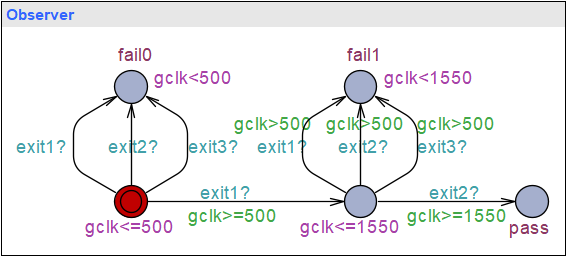
In this example, we know the exact time of the inputs & observations, and thus `lower_bounds == upper_bounds`. If you are not sure about the exact time, or you just want to add uncertainty, e.g., the first ball goes from `Exit1` at gclk $\in$ [490, 510], you can just set the lower bound to 490, and the upper bound to 510.
```python
import pyuppaal as pyu
# VERIFYTA_PATH = "uppaal\\uppaal64-4.1.26\\bin-Windows\\verifyta.exe"
VERIFYTA_PATH = r"C:\Users\10262\OneDrive\PortableApps\PortableApps\Win_Linux-uppaal64-4.1.26\bin-Windows\verifyta.exe"
# set verifyta path
pyu.set_verifyta_path(VERIFYTA_PATH)
# Load the `xml` model
pipeNet = pyu.UModel("demo_PipeNet.xml")
# save as a new file in order not to overwrite current file
pipeNet = pipeNet.save_as("demo_PipeNet_new.xml")
# Define the input. (action_name, lower bound(guard), upper bound(invariant))
inputs = [('input_ball!', 'gclk>=0', 'gclk<=0'), ('input_ball!', 'gclk>=1000', 'gclk<=1000')]
# Define the observation. (action_name, lower bound(guard), upper bound(invariant))
observations = [('exit1?', 'gclk>=500', 'gclk<=500'), ('exit2?', 'gclk>=1550', 'gclk<=1550')]
# Add input template.
pipeNet.add_input_monitor(inputs)
# observable actions
sigma_o = ['exit1', 'exit2', 'exit3']
# Add observation template.
pipeNet.add_observer_monitor(observations, sigma_o=sigma_o)
# Query whether the model can simulate the inputs & observations
pipeNet.queries = 'E<> Observer.pass'
# Get one possible trace.
# return as `pyuppaal.SimTrace`
trace = pipeNet.easy_verify()
print("======== untime pattern: ========")
print("pattern:", trace.untime_pattern)
print("\n======== detailed parsed trace: ========")
print("trace:", trace)
```
======== untime pattern: ========
pattern: ['input_ball', 'hidden_path1', 'hidden_path3', 'exit1', 'input_ball', 'hidden_path1', 'hidden_path4', 'exit2']
======== detailed parsed trace: ========
trace: State [0]: ['PipeNet.Idle', 'Input._id8', 'Observer._id11']
global_variables [0]: None
Clock_constraints [0]: [t(0) - gclk ≤ 0; t(0) - PipeNet.t ≤ 0; gclk - PipeNet.t ≤ 0; PipeNet.t - t(0) ≤ 0; ]
transitions [0]: input_ball: Input -> PipeNet; Input._id8 -> Input._id9; PipeNet.Idle -> PipeNet.Cross1;
-----------------------------------
State [1]: ['PipeNet.Cross1', 'Input._id9', 'Observer._id11']
global_variables [1]: None
Clock_constraints [1]: [t(0) - gclk ≤ 0; t(0) - PipeNet.t ≤ 0; gclk - t(0) ≤ 500; gclk - PipeNet.t ≤ 0; PipeNet.t - gclk ≤ 0; ]
transitions [1]: hidden_path1: PipeNet -> ; PipeNet.Cross1 -> PipeNet.Cross2;
-----------------------------------
State [2]: ['PipeNet.Cross2', 'Input._id9', 'Observer._id11']
global_variables [2]: None
Clock_constraints [2]: [t(0) - gclk ≤ 0; t(0) - PipeNet.t ≤ 0; gclk - t(0) ≤ 500; gclk - PipeNet.t ≤ 300; PipeNet.t - gclk ≤ -200; ]
transitions [2]: hidden_path3: PipeNet -> ; PipeNet.Cross2 -> PipeNet.Exit1;
-----------------------------------
State [3]: ['PipeNet.Exit1', 'Input._id9', 'Observer._id11']
global_variables [3]: None
Clock_constraints [3]: [t(0) - gclk ≤ 0; t(0) - PipeNet.t ≤ -200; gclk - t(0) ≤ 500; PipeNet.t - gclk ≤ -200; ]
transitions [3]: exit1: PipeNet -> Observer; PipeNet.Exit1 -> PipeNet.Reset; Observer._id11 -> Observer._id12;
-----------------------------------
State [4]: ['PipeNet.Reset', 'Input._id9', 'Observer._id12']
global_variables [4]: None
Clock_constraints [4]: [t(0) - gclk ≤ -500; t(0) - PipeNet.t ≤ -200; gclk - t(0) ≤ 500; PipeNet.t - t(0) ≤ 300; ]
transitions [4]: None: PipeNet -> PipeNet; PipeNet.Reset -> PipeNet.Idle;
-----------------------------------
State [5]: ['PipeNet.Idle', 'Input._id9', 'Observer._id12']
global_variables [5]: None
Clock_constraints [5]: [t(0) - gclk ≤ -500; t(0) - PipeNet.t ≤ 0; gclk - t(0) ≤ 1000; gclk - PipeNet.t ≤ 300; PipeNet.t - gclk ≤ -200; ]
transitions [5]: input_ball: Input -> PipeNet; Input._id9 -> Input.pass; PipeNet.Idle -> PipeNet.Cross1;
-----------------------------------
State [6]: ['PipeNet.Cross1', 'Input.pass', 'Observer._id12']
global_variables [6]: None
Clock_constraints [6]: [t(0) - gclk ≤ -1000; t(0) - PipeNet.t ≤ 0; gclk - t(0) ≤ 1550; gclk - PipeNet.t ≤ 1000; PipeNet.t - gclk ≤ -1000; ]
transitions [6]: hidden_path1: PipeNet -> ; PipeNet.Cross1 -> PipeNet.Cross2;
-----------------------------------
State [7]: ['PipeNet.Cross2', 'Input.pass', 'Observer._id12']
global_variables [7]: None
Clock_constraints [7]: [t(0) - gclk ≤ 0; t(0) - PipeNet.t ≤ 0; gclk - t(0) ≤ 1550; gclk - PipeNet.t ≤ 1300; PipeNet.t - gclk ≤ -1200; ]
transitions [7]: hidden_path4: PipeNet -> ; PipeNet.Cross2 -> PipeNet.Exit2;
-----------------------------------
State [8]: ['PipeNet.Exit2', 'Input.pass', 'Observer._id12']
global_variables [8]: None
Clock_constraints [8]: [t(0) - gclk ≤ 0; t(0) - PipeNet.t ≤ -200; gclk - t(0) ≤ 1550; gclk - PipeNet.t ≤ 1300; PipeNet.t - t(0) ≤ 300; PipeNet.t - gclk ≤ -1200; ]
transitions [8]: exit2: PipeNet -> Observer; PipeNet.Exit2 -> PipeNet.Reset; Observer._id12 -> Observer.pass;
-----------------------------------
State [9]: ['PipeNet.Reset', 'Input.pass', 'Observer.pass']
global_variables [9]: None
Clock_constraints [9]: [t(0) - gclk ≤ -1550; t(0) - PipeNet.t ≤ -250; gclk - t(0) ≤ 1550; PipeNet.t - t(0) ≤ 300; ]
### 4. Visualize the Architecture
You can visualize the architecture by getting the communication graph in [mermaid](https://mermaid.live/) format.
[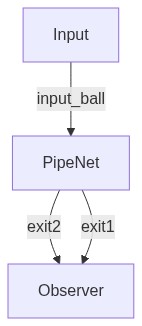](https://mermaid.live/edit#pako:eNpVjs0KwjAQhF-l7Lk56DEHT714UUGPC7JttjaQpCHdiFL67kYo_pxmmG8GZoZuNAwaboniUF0aDCcb-cCCYR9iLnJsJ053TmuglH3LtSXnlNp92qtRih9WtoV8d39o84OgBs_JkzXlwYyhqhBkYM8IuljDPWUnCBiWUqUs4_kZOtCSMteQoyHhxlL57kH35CZeXq-ESg8)
```python
# visualize via https://mermaid.live/
cg = pipeNet.get_communication_graph(is_beautify=False)
print(cg)
```
```mermaid
graph TD
PipeNet
Input
Observer
Input--input_ball-->PipeNet
PipeNet--exit3-->Observer
PipeNet--exit2-->Observer
PipeNet--exit1-->Observer```
### 5. Find all patterns
You can get all possible patterns by the following code, and all possible patterns are shown in the figure below. The cache file `tmp_find_all_patterns_id.xml` can be found in the same path of the model.
1. The first observation at `Exit1` is suggested by the red line.
2. The second observation at `Exit2` is suggested by 2 the green and yellow line, meaning there are two possible patterns for this observation.
 ```python
# Find all possible traces.
traces = pipeNet.find_all_patterns()
# print patterns.
for i, trace in enumerate(traces):
print(f'pattern{i+1}', trace.untime_pattern)
print()
assert len(traces)==2
# alternative method with iterator
all_patterns_iter = pipeNet.find_all_patterns_iter()
traces = list(all_patterns_iter)
for i, trace in enumerate(traces):
print(f'pattern{i+1}', trace.untime_pattern)
assert len(traces)==2
```
pattern1 ['input_ball', 'hidden_path1', 'hidden_path3', 'exit1', 'input_ball', 'hidden_path1', 'hidden_path4', 'exit2']
pattern2 ['input_ball', 'hidden_path1', 'hidden_path3', 'exit1', 'input_ball', 'hidden_path2', 'hidden_path5', 'exit2']
pattern1 ['input_ball', 'hidden_path1', 'hidden_path3', 'exit1', 'input_ball', 'hidden_path1', 'hidden_path4', 'exit2']
pattern2 ['input_ball', 'hidden_path1', 'hidden_path3', 'exit1', 'input_ball', 'hidden_path2', 'hidden_path5', 'exit2']
```python
# Find all possible traces.
traces = pipeNet.find_all_patterns()
# print patterns.
for i, trace in enumerate(traces):
print(f'pattern{i+1}', trace.untime_pattern)
print()
assert len(traces)==2
# alternative method with iterator
all_patterns_iter = pipeNet.find_all_patterns_iter()
traces = list(all_patterns_iter)
for i, trace in enumerate(traces):
print(f'pattern{i+1}', trace.untime_pattern)
assert len(traces)==2
```
pattern1 ['input_ball', 'hidden_path1', 'hidden_path3', 'exit1', 'input_ball', 'hidden_path1', 'hidden_path4', 'exit2']
pattern2 ['input_ball', 'hidden_path1', 'hidden_path3', 'exit1', 'input_ball', 'hidden_path2', 'hidden_path5', 'exit2']
pattern1 ['input_ball', 'hidden_path1', 'hidden_path3', 'exit1', 'input_ball', 'hidden_path1', 'hidden_path4', 'exit2']
pattern2 ['input_ball', 'hidden_path1', 'hidden_path3', 'exit1', 'input_ball', 'hidden_path2', 'hidden_path5', 'exit2']